What does Dwamiey connect?
Employees and departments, attendance, tasks, communication, files and approvals share one company environment. Knowledge stays connected to the people and decisions behind the work.
Connect employees, attendance and tasks with team communication, company files and management visibility. Dwamiey brings people and work into context so you can see what needs attention.
Dwamiey attendance
Smart attendance
Recorded hours by employee
Attendance overview
Employee Statistics
Team signals
Employees and departments, attendance, tasks, communication, files and approvals share one company environment. Knowledge stays connected to the people and decisions behind the work.
Founders, general managers, operations leaders and department heads coordinating daily company work as their teams grow.
Daily people-and-work operations. This is not an accounting, inventory, payroll or complete ERP offering. Evaluate those requirements separately.
Attendance sits in one system, tasks in another, and decisions get buried in messages and files. Management has to piece together who is involved, what is happening and where to follow up.
Work falls between chat, spreadsheets, and disconnected task lists.
Managers cannot quickly see who is available, late, remote, or absent.
Policies, attachments, and decisions scatter across channels and folders.
Requests wait because the right approver or status is not obvious.
Important decisions are buried in conversations without operational context.
Leaders spend time asking for updates instead of acting on live signals.
Managers become the integration layer between people, tools, and deadlines.
Review the company context, find the relevant team and open the work or information you need to follow up.
Start with the company and its departments, find the relevant people, then open the tasks, attendance or information behind the situation.
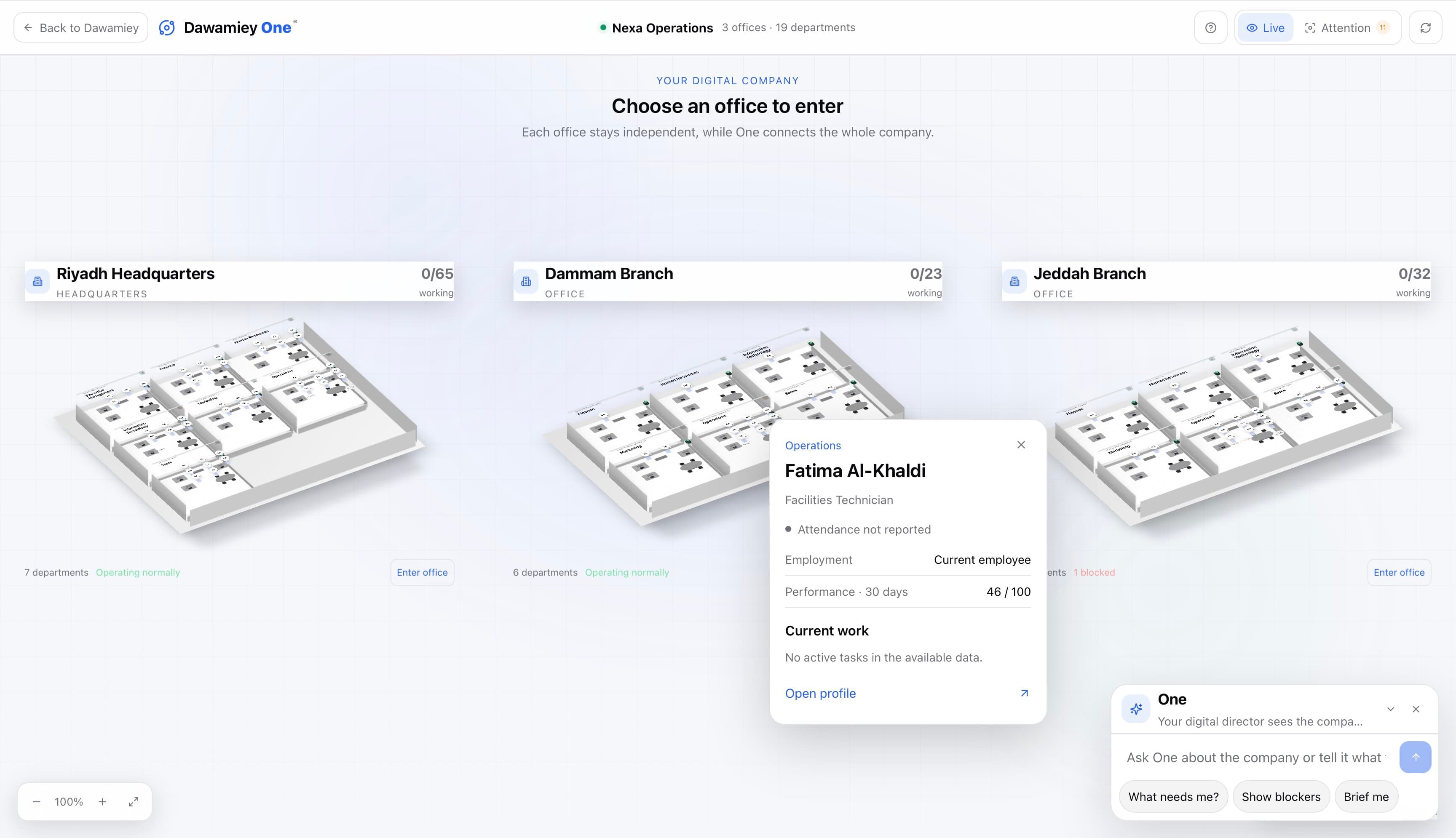
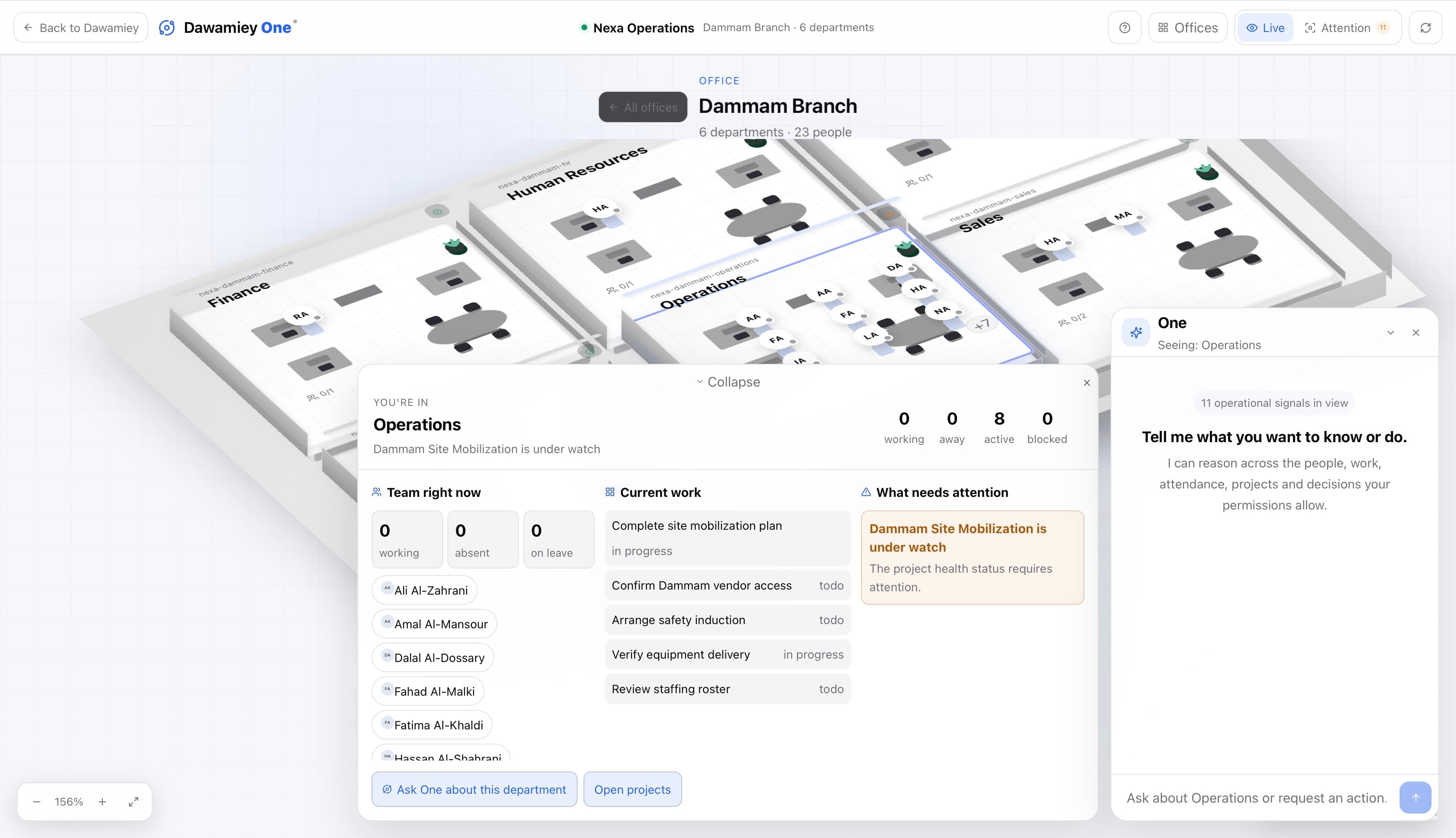
Dwamiey One lets you move from the company to an office or branch, a department and its employees. Review the related attendance and tasks, then open the work that needs attention within your permissions.
Company → office or branch → department → employee → work → follow-up.
Use the existing company structure to find the office, department and employees involved.
See attendance and the tasks or projects associated with the department.
Move from the company view to the relevant work details for follow-up.
The view respects the information and actions available to the current user.
Manage attendance, tasks, teams, approvals, communication, and productivity from anywhere.
Dwamiey mobile app for iPhone and Android.
Install Dwamiey and manage your company from anywhere.
Dwamiey packages modules into product editions, so teams can start with the essentials and expand into advanced collaboration, records, AI, and Rooms when they need them.
Know who is working, where attendance needs review, and how availability affects execution.
Turn plans into assigned work with progress, blockers, priorities, reports, and delivery visibility.
Keep company events, meetings, schedules, and shared availability connected to work context.
Give teams fast communication without separating decisions from the workspace where work happens.
Host secure video rooms with scheduled meetings, screen sharing, calendar links, and external guest access when the edition allows it.
Centralize documents, policies, values, announcements, and company knowledge in one trusted place.
Control who can view, approve, manage, or change sensitive workflows and company data.
Support paid workspace activation, trials, payment links, and admin-controlled subscription management.
Help managers ask better questions, find information faster, and reduce manual coordination.
Sarah helps you find information, understand what needs attention, and prepare everyday actions across Dwamiey — all within your permissions.
Your company context. One AI assistant.
Ask Sarah about tasks, attendance, projects, teams, follow-ups, or what needs attention today.
Sarah helps you find relevant company information without searching through multiple pages.
Prepare tasks, calendar events, messages, and follow-ups directly from the conversation.
Sarah only works with the information and actions the current user is allowed to access.
Understand work health, team activity, approvals, and operational movement from one place.
Connect attendance, employee profiles, leave context, company structure, and permissions.
Track tasks, reports, blockers, owners, and priorities without losing context in separate tools.
Align team communication, responsibilities, files, and follow-ups in the same workspace.
Access work, updates, files, calendar, messages, and requests without switching between systems.
Dwamiey is designed for teams that need professional control over roles, access, subscriptions, and operational visibility. It is built by Desitech UG for companies that want one serious workspace instead of a patchwork of tools.
Control access by role and responsibility.
Keep workspace access tied to authenticated users and verified payment or admin activation.
Manage workspace identity, users, modules, subscriptions, and operational settings.
Keep approvals, tickets, billing events, and key actions easier to review.
Give users the information they need without exposing every company surface.
A product direction focused on enterprise-grade business operations.
Point solutions can solve one problem. Dwamiey connects the daily company operating picture across people, work, communication, knowledge, and subscriptions.
| Outcomes | Attendance app | Task app | Chat app | File storage | Calendar | Dwamiey |
|---|---|---|---|---|---|---|
| Daily visibility | Attendance only | Tasks only | Conversation only | Documents only | Events only | People, work, updates, and events together |
| Manager follow-up | Manual checks | Status chasing | Message digging | Link hunting | Schedule checks | One workspace to review and act |
| Company context | Limited | Partial | Unstructured | Disconnected | Time-based | Connected to teams, roles, files, and approvals |
Start with Core, move into Workspace or Business, or unlock Enterprise modules like Workspaces, Archive, AI Assistant, and Dwamiey Rooms.
For larger teams, special limits, migration needs, or a tailored contract, contact us and we will shape the right plan.
The scope described here is people, work, communication, knowledge and management visibility. It does not promise accounting, inventory, payroll processing or a complete ERP replacement.
Dwamiey is designed around web and mobile workflows so teams can keep work moving from more than one device.
Yes. Dwamiey connects people operations, attendance, projects, tasks, communication, and company context in one workspace.
Dwamiey Rooms is positioned in Dwamiey Enterprise together with Workspaces, Archive, and AI Assistant.
The public experience supports English, Arabic, German, French, and Spanish, including right-to-left layout for Arabic.
Dwamiey includes roles and permissions so access can be controlled according to responsibility and workspace needs.
For teams moving from fragmented tools, contact us so the subscription and migration path can be planned responsibly.
Choose an available edition and submit your company details. Dwamiey creates an active company workspace with a free seven-day trial subscription and emails an invitation to the owner. Accept the invitation to start using the workspace. This is not a booked product demonstration.
Explore task ownership, attendance review or people-and-work coordination. Each page explains the relevant workflow and its scope.
Plan company projects, assign work, and track milestones with Dwamiey. Review delivery dates and task progress on the project board and timeline.
Keep work conversations in Dwamiey with direct messages, group chat, file sharing, and access controls based on membership and workspace permissions.
Review check-ins, check-outs, working hours and attendance exceptions alongside employee and leave context. Explore Dwamiey attendance management and a 7-day free trial.
Coordinate employees, departments, attendance, leave context and daily tasks with Dwamiey workforce management software. Review its scope and explore a 7-day free trial.
Assign employee tasks, set priorities and due dates, and review progress with company context. Explore Dwamiey team task management software and a 7-day free trial.
Use Dwamiey’s AI business operations assistant to review absences, find overdue tasks, and summarize project progress within your workspace permissions.
Explore how employees, tasks, attendance, communication and company knowledge fit together. Choose an available edition in the existing company trial flow.